
Pages: 1
|
|
Posted on 04-18-21, 09:36 am
|
 Bullet Bill Bullet Billsomething that resembles the blaze of a fire  Karma: 554 Posts: 51/502 Since: 03-18-21 |
Hey people. I imported a tileset into 0 (jyotyu) and in the editor it looked real nice before the level started: |
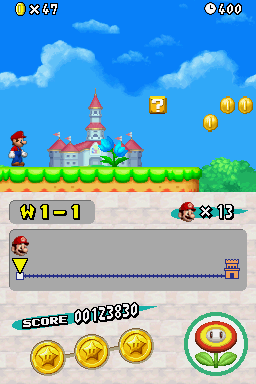
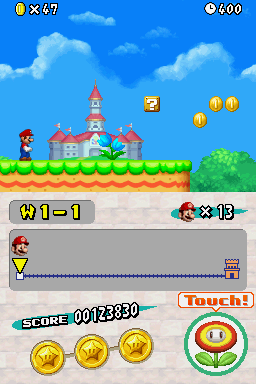

|
|
Posted on 04-18-21, 10:53 am
|
|
The boy who always has something up his sleeve
 Karma: 968 Posts: 136/754 Since: 02-01-21 |
I know your problem perfectly, the same thing happens to me, I don't know what the cause is, but I would like someone to help please
_________________________ The star project that shows my brilliant mind  |
| M3N Team |
Posted on 04-18-21, 12:31 pm (rev. 1 by M3N Team on 04-18-21, 12:32 pm)
|
 Red Goomba Red GoombaKarma: 252 Posts: 33/40 Since: 02-17-18 |
Did you edit the animation d_2d_TEN_A_J_jyotyu_ncg.bin or only change the tileset? If not, it must be changed in:
root\BG_ncg\d_2d_TEN_A_J_jyotyu_ncg.bin with the pallette: root\BG_ncl\d_2d_A_J_jyotyu_ncl.bin, root\BG_ncl\d_2d_A_J_jyotyu_B_ncl.bin and root\BG_ncl\d_2d_A_J_jyotyu_F_ncl.bin I hope I have been helpful. 
|
|
|
Posted on 04-18-21, 12:33 pm
|
|
Bullet Bill something that resembles the blaze of a fire Karma: 554 Posts: 52/502 Since: 03-18-21 |
Yes I think there are files in the ROM File Browser that you need to edit, but I don't know which ones are them. |
|
|
Posted on 04-18-21, 03:35 pm (rev. 1 by
|
|
The boy who always has something up his sleeve
Karma: 968 Posts: 138/754 Since: 02-01-21 |
I tried and the jyotou this came back shit the jyoutou
 , but I will try again, the palettes that he says are correct, the jyoutou palettes are delicate so make a backup to avoid loss of work, maybe I will do that later, andI will bring a more tutorial detailed , but I will try again, the palettes that he says are correct, the jyoutou palettes are delicate so make a backup to avoid loss of work, maybe I will do that later, andI will bring a more tutorial detailed
_________________________ The star project that shows my brilliant mind |
| M3N Team |
Posted on 04-18-21, 06:57 pm
|
|
Red Goomba Karma: 252 Posts: 34/40 Since: 02-17-18 |
I found this on this MeroMero forum, which maybe could help you (it is an example):
Posted by MeroMero NSMBWii Jyotyu tileset is a recurring request by folks there, so wait no longer and grab all the necessary files below! NSMBWii Jyotyu tileset! Tileset 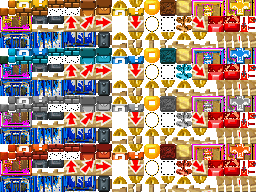 NSMB editor -> Tilesets -> Tileset 0 (Jyotyu) and click Import to import this file: jyotyu.nmt You will also need to import the palettes separately since the .nmt will only update the default jyotyu palette: NSMB editor -> ROM File Browser -> FILESYSTEM -> root -> BG_ncl -> d_2d_A_J_jyotyu_B_ncl.bin NSMB editor -> ROM File Browser -> FILESYSTEM -> root -> BG_ncl -> d_2d_A_J_jyotyu_ncl.bin NSMB editor -> ROM File Browser -> FILESYSTEM -> root -> BG_ncl -> d_2d_A_J_jyotyu_R_ncl.bin NSMB editor -> ROM File Browser -> FILESYSTEM -> root -> BG_ncl -> d_2d_A_J_jyotyu_W_ncl.bin Animated blocks  NSMB editor -> ROM File Browser -> FILESYSTEM -> root -> BG_ncg -> d_2d_TEN_A_J_jyotyu_ncg.bin Animated blocks when being pressed from below 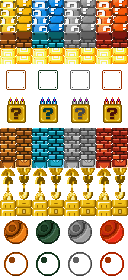 NSMB editor -> ROM File Browser -> FILESYSTEM -> root -> obj -> A_block_ncg.bin Broken blocks 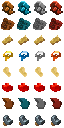 NSMB editor -> ROM File Browser -> FILESYSTEM -> root -> obj -> A_block_hahen_ncg.bin 1-up game blocks  NSMB editor -> ROM File Browser -> FILESYSTEM -> root -> obj -> I_minigame_block_ncg.bin You will also need to import the Donut Lift and the Door since those are present in the Jyotyu tileset: Donut Lift  NSMB editor -> ROM File Browser -> FILESYSTEM -> root -> obj -> A_tikuwa_block_ncg.bin Door  NSMB editor -> ROM File Browser -> FILESYSTEM -> root -> enemy -> W_tobira.nsbmd NSMB editor -> ROM File Browser -> FILESYSTEM -> root -> obj -> I_kakushitobira_ncg.bin Have fun  |
|
|
Posted on 04-18-21, 07:09 pm
|
|
Bullet Bill something that resembles the blaze of a fire Karma: 554 Posts: 56/502 Since: 03-18-21 |
I know you didn't wrote all that, but that was really helpful. Thanks |

Pages: 1