
Pages: 1
|
|
Posted on 08-17-15, 06:40 am (rev. 1 by
|
 Red Paratroopa Red ParatroopaFriend of N64s and DSes  Karma: 516 Posts: 10/171 Since: 07-26-15 |
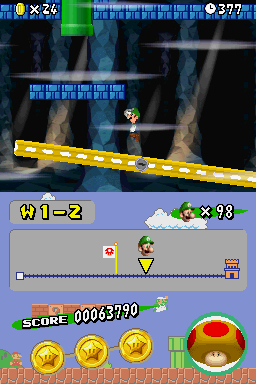
I decided to make a custom seesaw texture for my hack, and when I was testing it in-game, it appeared like this.
But the actual texture is this: So, am I doing something wrong, or does the seesaw model not allow transparency? _________________________  My Youtube Channel My Youtube Channel "Never use a flash drive unless you are transferring files." - Me, around 10 years ago |

|
|
Posted on 08-17-15, 07:13 am (rev. 1 by
|
 Karma: 19852 Posts: 190/1100 Since: 04-02-13 |
Probably the latter. Since the model does not have animations, though, you could remake it to do so.
|
|
|
Posted on 08-17-15, 12:01 pm
|
 Birdo Birdo Karma: 2809 Posts: 1442/2091 Since: 06-26-11 |
I've probably missed something, but what do you mean about animations?
Texture animations, for adding transparency? Or what? |
|
|
Posted on 08-17-15, 12:16 pm
|
|
Karma: 19852 Posts: 191/1100 Since: 04-02-13 |
Since the model doesn't have animations, you can easily export it, add a transparent texture and then remake the nsbmd so that the transparency shows up properly.
|
|
|
Posted on 08-17-15, 02:28 pm (rev. 1 by
|
|
Red Paratroopa Friend of N64s and DSes Karma: 516 Posts: 11/171 Since: 07-26-15 |
Ah, that makes sense now, although there is still scaling to deal with.
Edit: Turns out exporting to obj doesn't work out really well, so I just converted the file to NSBMD + NSBTX, modified the nsbtx, and reconverted it to nsbmd instead, and it worked! 
_________________________ My Youtube Channel"Never use a flash drive unless you are transferring files." - Me, around 10 years ago |
Pages: 1