
Pages: 1
|
|
Posted on 03-05-25, 09:09 pm
|
 Panser PanserNew Super Mario Bros.: Blasting off Again! status: procrastinating  Karma: 646 Posts: 184/329 Since: 08-24-24 |
So, how exactly do I use the zoom actor? Sometimes I'm struggling with the camera. Ceiling stuff that I can get on-screen along with the ground in the DS screen previewer of NSMBe will sometimes not be visible in-game because too much of the ground is visible. I could fix this by changing the level design, but I don't want that, so zooming out is a better option. But how do I use this zoom actor? Do I assign a zone to it or something? And how does the zoom actor behave when empty squares/objects 5 (or whatever the one was that 'forbids' the camera to enter a filled square) are in its field of view? Don't tell me about aspect ratio stuff, I do know that.
"To boldly glitch where no one has glitched before" - Staryu Trek Sig background from dreamstime.com Avatar Staryu model from Retromesh (edited) Avatar background from space.com |
|
|
Posted on 03-05-25, 09:50 pm
|
 Nipper Plant Nipper PlantI do things sometimes  Karma: 1259 Posts: 373/423 Since: 08-07-17 |
this was more or less the setup that i recommended to someone else
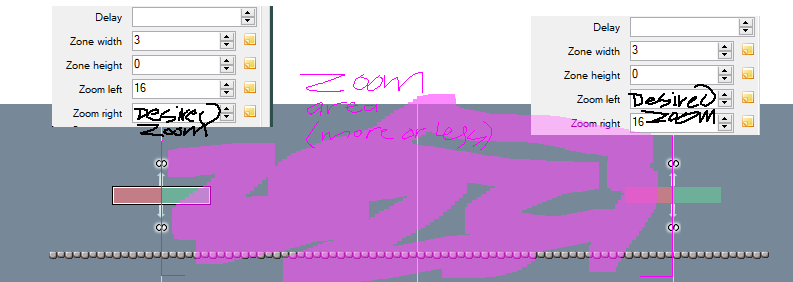 the zoom actor has two areas that set two different zoom ammounts, so by making one that zooms to the default zoom ammount on the left side and the desired zoom ammount on the right side it effectively makes a vertical line of sorts that zooms out when you pass it from left to right and resets the zoom when you go back. then you can make another zoom that zooms to the default zoom on the right n zooms to the desired zoom on the left to make an area of sorts that when entered zooms out and when exited resets the zoom. youll also probs wanna add a delay |
|
|
Posted on 03-06-25, 06:59 am
|
|
Panser New Super Mario Bros.: Blasting off Again! status: procrastinating Karma: 646 Posts: 185/329 Since: 08-24-24 |
Thanks and I'll play around with the delay.
"To boldly glitch where no one has glitched before" - Staryu Trek Sig background from dreamstime.com Avatar Staryu model from Retromesh (edited) Avatar background from space.com |
|
|
Posted on 03-07-25, 02:05 am
|
 Mole MoleGoomba's run the world...  Karma: 473 Posts: 315/358 Since: 08-27-20 |
A good thing to play around with is where exactly you place the zoom actor. If it's in a funky place sometimes it doesn't work. All you really should need to do is place it on the ground and add a tile height for the range, works for most scenarios unless you have a really tall level.
Also, if you don't use delay, it basically just zooms the camera out instantly without any transition. So, if you were going for that you shouldn't need the delay, but the more delay you put on it the slower the zooming out/in animation is. _________________________  Hacks Channel: https://www.youtube.com/channel/UCqA5CgsW-CTfD56DCa2kvYw/channels |
|
|
Posted on 03-07-25, 02:07 am
|
 Snifit SnifitUnfortunately, where there is light, there is dark. Where there's a Star, there's a Ztar!  Karma: 1137 Posts: 237/282 Since: 02-02-24 |
Also, the zoom doesn't seem to work when it's outside of the view
_________________________  
|
|
|
Posted on 03-07-25, 02:09 am
|
|
Mole Goomba's run the world... Karma: 473 Posts: 316/358 Since: 08-27-20 |
Yeah, it's usually tied to the view I think, so if the object isn't in the view the whole sprite doesn't load
_________________________ Hacks Channel: https://www.youtube.com/channel/UCqA5CgsW-CTfD56DCa2kvYw/channels |
|
|
Posted on 03-07-25, 07:52 am
|
|
Panser New Super Mario Bros.: Blasting off Again! status: procrastinating Karma: 646 Posts: 187/329 Since: 08-24-24 |
Probably to avoid letting out-of-the-view parts into the FOV. Placing the zoom actor on the ground should work in my level, it's a horizontal cave. And no, I'm not looking for immediate cuts, I want to use the zoom like in Newer, so I will use the delay. Anything that isn't a multiple of four acts glitchy, right?
"To boldly glitch where no one has glitched before" - Staryu Trek Sig background from dreamstime.com Avatar Staryu model from Retromesh (edited) Avatar background from space.com |
Pages: 1