
Pages: 1
| Stunt_LP |
Posted on 01-27-14, 03:08 pm (rev. 1 by ImageBot on 11-21-16, 02:45 am)
|
 Red Cheep-cheep Red Cheep-cheepReregistered  Karma: 13 Posts: 142/214 Since: 03-04-13 |
Hey there!
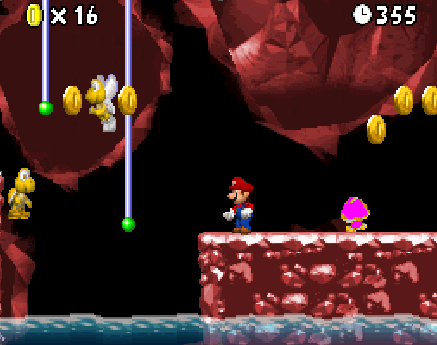
I have edited the Koopa grafics. But now the goomba grafics look so: In the editor the grafics looks normal. Hope you can help me 
|
|
|
Posted on 01-27-14, 03:10 pm
|
|
We do what we must because we can
 Karma: 5627 Posts: 511/1431 Since: 06-25-13 |
Are you sure you did not recreate the palette enemy.ncl?
_________________________ Super Mario Bros. - The New Worlds | Full release Super Mario Castle 2 | Full release Super Mario Castle 3 | Full release My Youtube channel |
| Stunt_LP |
Posted on 01-27-14, 03:11 pm
|
|
Red Cheep-cheep Reregistered Karma: 13 Posts: 143/214 Since: 03-04-13 |
I am sure. And I tested it in the editor with all of the 4 palettes. And it looked right.
|
|
|
Posted on 01-27-14, 03:42 pm
|
 Super Mario Super MarioAAaAaaaaAAAaaaa Karma: 10244 Posts: 3980/4464 Since: 06-08-11 |
The pink color is the color the editor uses to fill the remaining colors of a picture when recreating it. So you DID import from .png recreating the palette.
Replace the palette with the original one again. This should make the goomba get the original colors again. Then import the koopa png again WITH EXISTING PALETTE. |
| Stunt_LP |
Posted on 01-27-14, 05:56 pm
|
|
Red Cheep-cheep Reregistered Karma: 13 Posts: 144/214 Since: 03-04-13 |
Hmm. But the I haven't so many colors for the koopas. And if I import the koopa image in one of the palettes. And the import it in another one, the first is buggy.
|
Pages: 1