
Pages: 1
| Stunt_LP |
Posted on 12-30-13, 01:43 pm (rev. 1 by ImageBot on 11-21-16, 02:39 am)
|
 Red Cheep-cheep Red Cheep-cheepReregistered  Karma: 13 Posts: 128/214 Since: 03-04-13 |
Hey there,
in my level there is a bug with the slopes. In editor the slope looks so: But in game it looks so: I hope you can help me! |
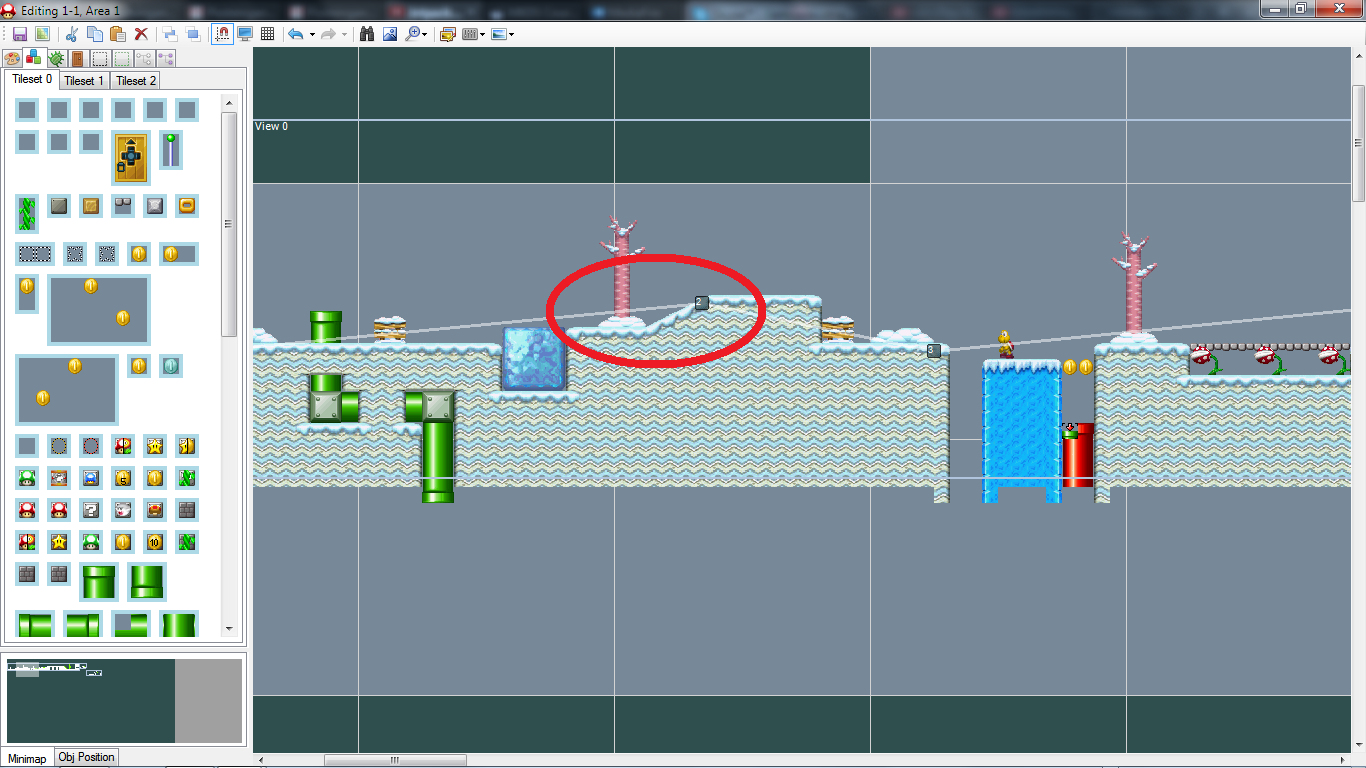
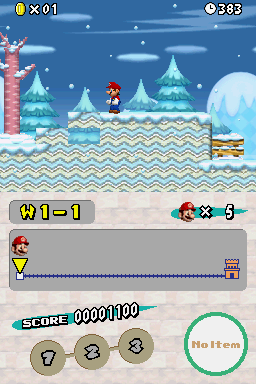
|
|
Posted on 12-30-13, 02:59 pm
|
|
We do what we must because we can
 Karma: 5627 Posts: 457/1431 Since: 06-25-13 |
Which values do you used for the slopes? In the tileset editor?
_________________________ Super Mario Bros. - The New Worlds | Full release Super Mario Castle 2 | Full release Super Mario Castle 3 | Full release My Youtube channel |
| Stunt_LP |
Posted on 12-30-13, 07:04 pm (rev. 1 by Stunt_LP on 12-30-13, 07:04 pm)
|
|
Red Cheep-cheep Reregistered Karma: 13 Posts: 129/214 Since: 03-04-13 |
|
|
Posted on 12-30-13, 07:10 pm
|
 Super Mario Super MarioAAaAaaaaAAAaaaa Karma: 10244 Posts: 3929/4464 Since: 06-08-11 |
Have a look at a 2x1 slope in an original Nintendo tileset, and make sure you're putting the exact same control bytes for every tile, and the exact same slope control tiles. It should work.
The editor renders slopes differently than the game, mostly because what we have now is "good enough" so I didn't bother to further improve it. So in some cases, when you do weird things with the control bytes that you weren't supposed to do, stuff renders differently ingame and in the editor 
|
| Stunt_LP |
Posted on 12-30-13, 07:54 pm (rev. 1 by ImageBot on 11-21-16, 02:39 am)
|
|
Red Cheep-cheep Reregistered Karma: 13 Posts: 130/214 Since: 03-04-13 |
Ok. This works now. But now there is another problem: If I go straight to the slope I can go inside:
But if I jump and land on the top of the same tile it acts like a normal slope: |
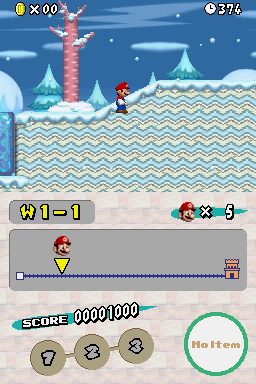
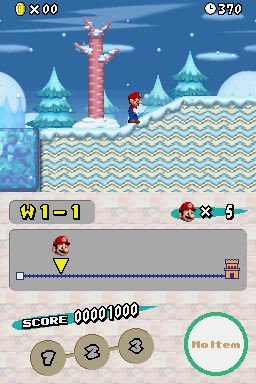
|
|
Posted on 12-30-13, 07:59 pm
|
|
Super Mario AAaAaaaaAAAaaaa Karma: 10244 Posts: 3931/4464 Since: 06-08-11 |
You have the wrong tile behavior for the "under slope" tiles. Check the original slopes and put the exact same tile behaviors.
|
| Stunt_LP |
Posted on 12-30-13, 08:24 pm
|
|
Red Cheep-cheep Reregistered Karma: 13 Posts: 131/214 Since: 03-04-13 |
No. I had the right. But it still doesnt work. The behavior are the same like in the original tileset.
|
|
|
Posted on 12-30-13, 11:24 pm
|
|
Death by cuteness
 Karma: 6649 Posts: 61/598 Since: 05-01-13 |
Expand the slope by 2 tiles to the left and 1 tile downwards, this should solve your problem.
|
| Stunt_LP |
Posted on 12-31-13, 09:45 am
|
|
Red Cheep-cheep Reregistered Karma: 13 Posts: 132/214 Since: 03-04-13 |
Do you mean in the objects tab?
|
|
|
Posted on 12-31-13, 10:10 am
|
|
We do what we must because we can
Karma: 5627 Posts: 459/1431 Since: 06-25-13 |
Yeah he means the object part. And I found smth. else for the other slopes: You should enable these values instead of the other ones:
_________________________ Super Mario Bros. - The New Worlds | Full release Super Mario Castle 2 | Full release Super Mario Castle 3 | Full release My Youtube channel |
| Stunt_LP |
Posted on 12-31-13, 10:33 am
|
|
Red Cheep-cheep Reregistered Karma: 13 Posts: 133/214 Since: 03-04-13 |
Hmm... Ok. I will try. Should I do this for all slopes?
|
|
|
Posted on 12-31-13, 12:06 pm
|
|
We do what we must because we can
Karma: 5627 Posts: 460/1431 Since: 06-25-13 |
No. Only for the slopes I selected in the picture. The other ones are all right.
_________________________ Super Mario Bros. - The New Worlds | Full release Super Mario Castle 2 | Full release Super Mario Castle 3 | Full release My Youtube channel |
| Stunt_LP |
Posted on 12-31-13, 12:36 pm
|
|
Red Cheep-cheep Reregistered Karma: 13 Posts: 134/214 Since: 03-04-13 |
Ok. I did. But the Bug is still there
|
Pages: 1