
Pages: 1
| MarioTheModder |
Posted on 04-29-26, 06:31 pm
|
 Goomba Goomba Karma: 39 Posts: 19/22 Since: 07-08-25 |
Well, as you can see, the minigame question blocks are messed up.
 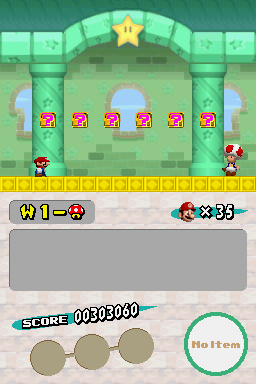 Could any body help me pls ? |
| Thierry |
Posted on 04-29-26, 07:11 pm
|
|
この記号は… 解読できないよ…
 Karma: 6272 Posts: 2817/2824 Since: 01-17-13 |
Either you corrupted something, or more likely you modified the Jyotyu palette somehow.
Did you import the Jyotyu tileset from, say, NewerDS? It uses a different palette than the original game does. Whatever the case, you will most likely have to modify the bitmap of the minigame question blocks to make it correspond to the new palette. Try to find the bitmap in the OBJ folder, open it alongside any of the Jyotyu palettes, export the bitmap to an image, fix the blocks in that image, and import the image back into the editor specifically using 'import with existing palettes' (otherwise your Jyotyu tileset will now look weird). |
| MarioTheModder |
Posted on 04-29-26, 07:15 pm
|
|
Goomba Karma: 39 Posts: 20/22 Since: 07-08-25 |
Posted by Thierry Either you corrupted something, or more likely you modified the Jyotyu palette somehow. Did you import the Jyotyu tileset from, say, NewerDS? It uses a different palette than the original game does. Whatever the case, you will most likely have to modify the bitmap of the minigame question blocks to make it correspond to the new palette. Try to find the bitmap in the OBJ folder, open it alongside any of the Jyotyu palettes, export the bitmap to an image, fix the blocks in that image, and import the image back into the editor specifically using 'import with existing palettes' (otherwise your Jyotyu tileset will now look weird). Well. actually I didn't imported the newerDS Ones, and thank you for your help  ! ! |
Pages: 1